Localizations
Use every keyword field your storefronts index
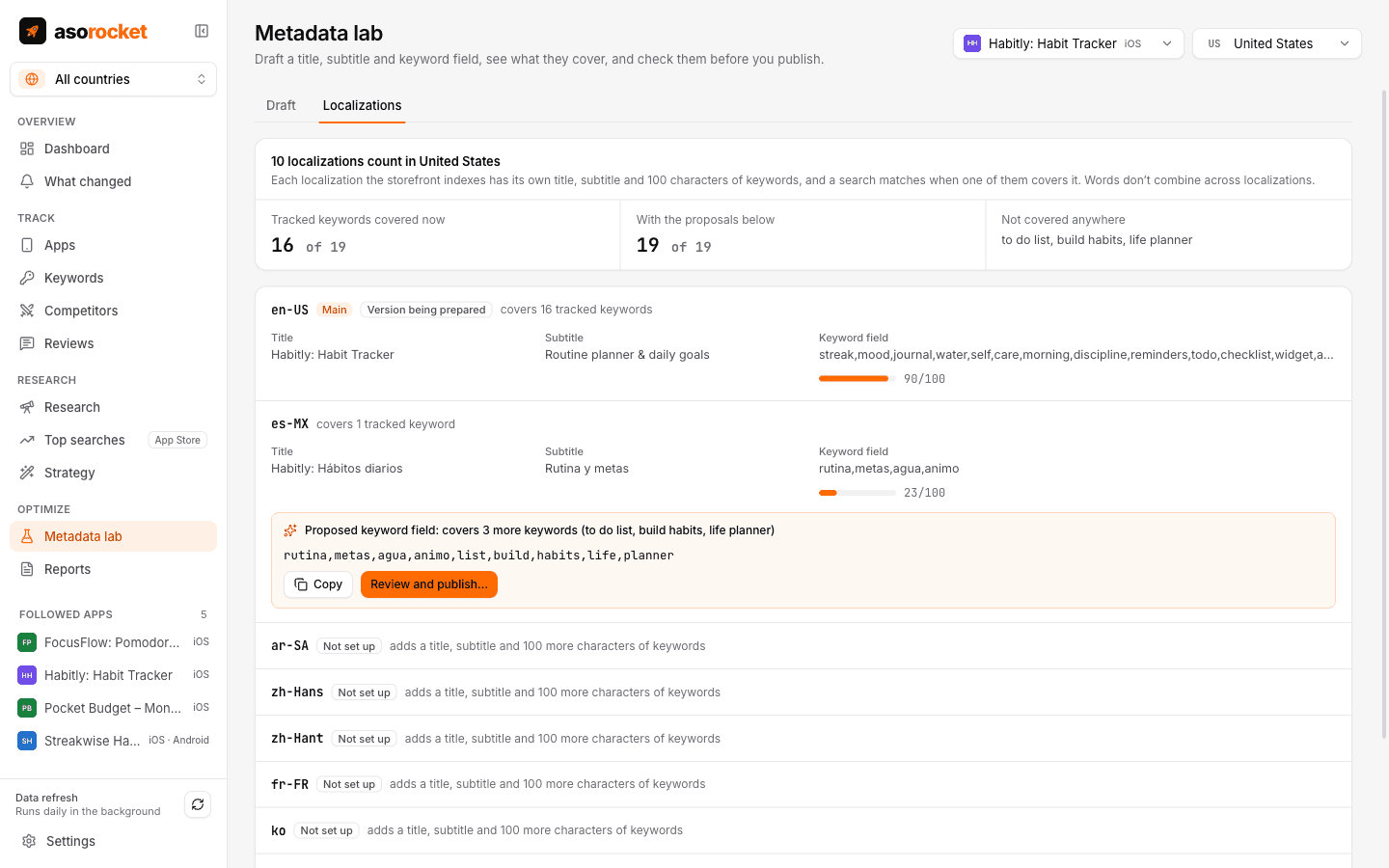
Storefronts are widely observed to index more than one language. The United States, for example, also counts Spanish (Mexico), French, Chinese and others, each with its own title, subtitle and 100 characters of keywords. The planner shows what each one covers and fills the room you leave empty.
What you get
Every localization a storefront counts
Each one with its title, subtitle, keyword field and a character meter, the main localization first.
What each one covers
Which tracked keywords each localization matches, and which match nowhere. Words don’t combine across localizations, so each is counted on its own.
Keyword fields filled for you
Proposals pack the keywords no localization covers yet into the free characters, with the same packing as Fill keyword field.
Room you haven’t used
Localizations you haven’t set up show as extra room: another title, subtitle and 100 characters of keywords.
Straight to publishing
Copy a proposal, or open it in the publish review for that language and send it to App Store Connect.
The lab’s rules
Coverage uses the same matching as the Metadata lab’s score, so the planner and the lab always agree.
What you need: Your hidden keyword fields and publishing need App Store Connect, for apps in your account.
Good to know
An observed mapping
Apple doesn’t publish which localizations each storefront indexes. asorocket uses the mapping ASO practitioners widely observe; track the new words to confirm they rank.
App Store apps
The planner is built on the App Store’s keyword fields. Google Play has no keyword field, so it isn’t offered for Google Play apps.
Related guides
Keywords · 2 min read
How to localize App Store keywords for other countries
Other storefronts often have far less competition. How to choose countries, research keywords locally and measure the result.
Metadata · 2 min read
How to use the App Store keyword field
Formatting, word choice and the common mistakes that waste the 100 hidden characters Apple gives you.
More features
All featuresKeyword rank tracking
Daily positions for every keyword in the App Store’s top 200 and Google Play’s top 30, with changes and history.
Learn moreKeyword research
Score a term, see who ranks, and check up to 1,000 keywords in one background run.
Learn moreMetadata lab
A live ASO score as you type, an automatic keyword field, and a pressure test before you ship.
Learn morePublish to App Store Connect
Push a checked draft into the version you’re preparing, after a careful review screen.
Learn moreStart with your own app, today
Download asorocket, pick your markets and find your app. You will be tracking your first keywords in about two minutes.
macOS · Windows · Linux